A2UI is a protocol that allows an AI agent to describe a user interface as JSON which the client then renders using its own native components (the agent can only make use of components from a “catalog” that the client provides). Google have just released Jetpack Compose support for A2UI (currently 1.0.0-alpha01) and in this article we’re going to show how it can be used along with the Koog based AI agent in the ClimateTraceKMP Kotlin Multiplatform sample (I covered the initial Koog exploration in that project in an earlier article). Koog can work with several different LLMs and we’re using Google Gemini in this case.
Note that the A2UI Compose libraries are Android only right now so, while the agent itself runs in shared KMP code, UI is only rendered in the Android client (the other clients just fall back to the text based responses the agent was returning before this change). The code shown here is in the a2ui-koog branch.
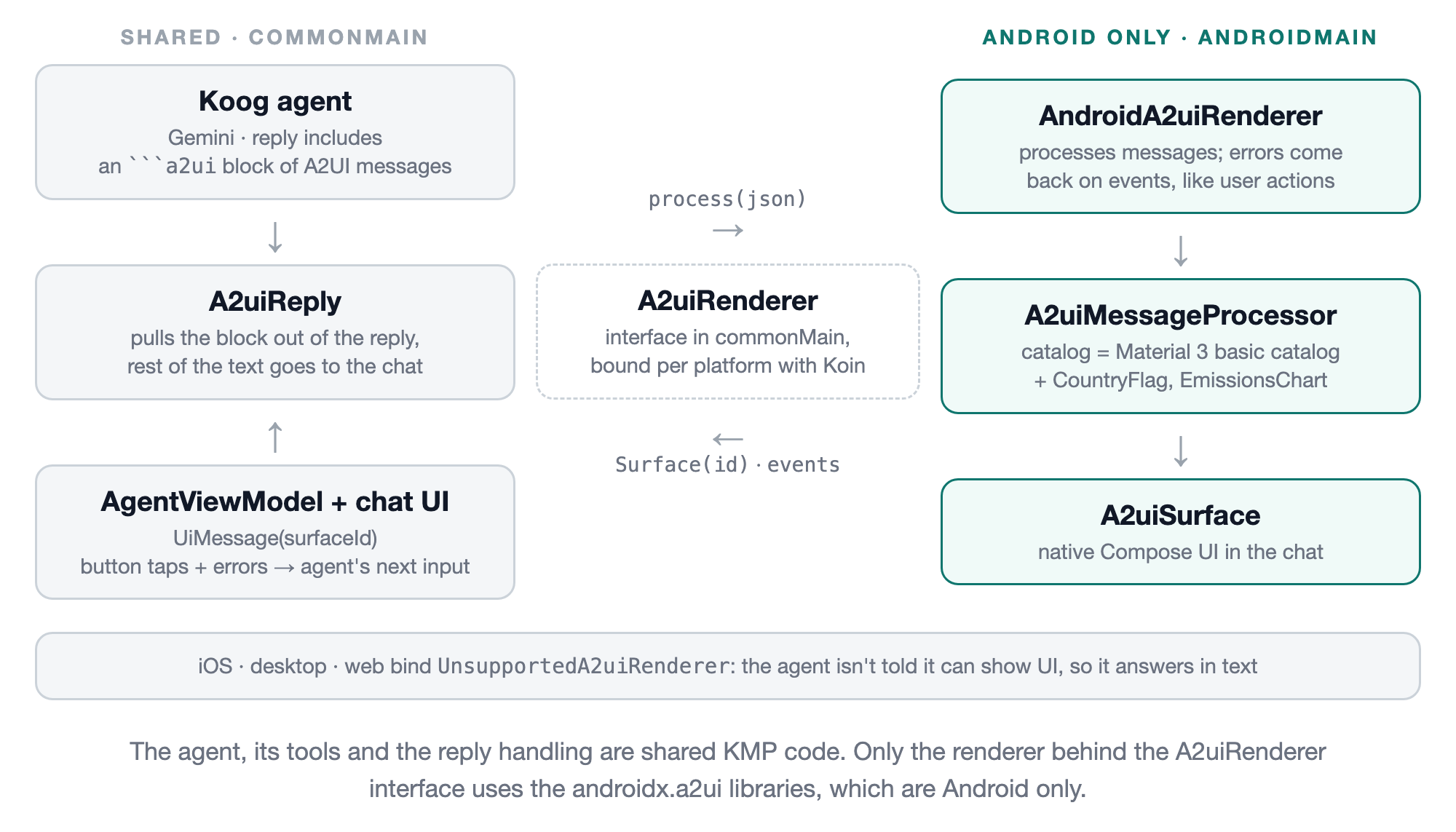
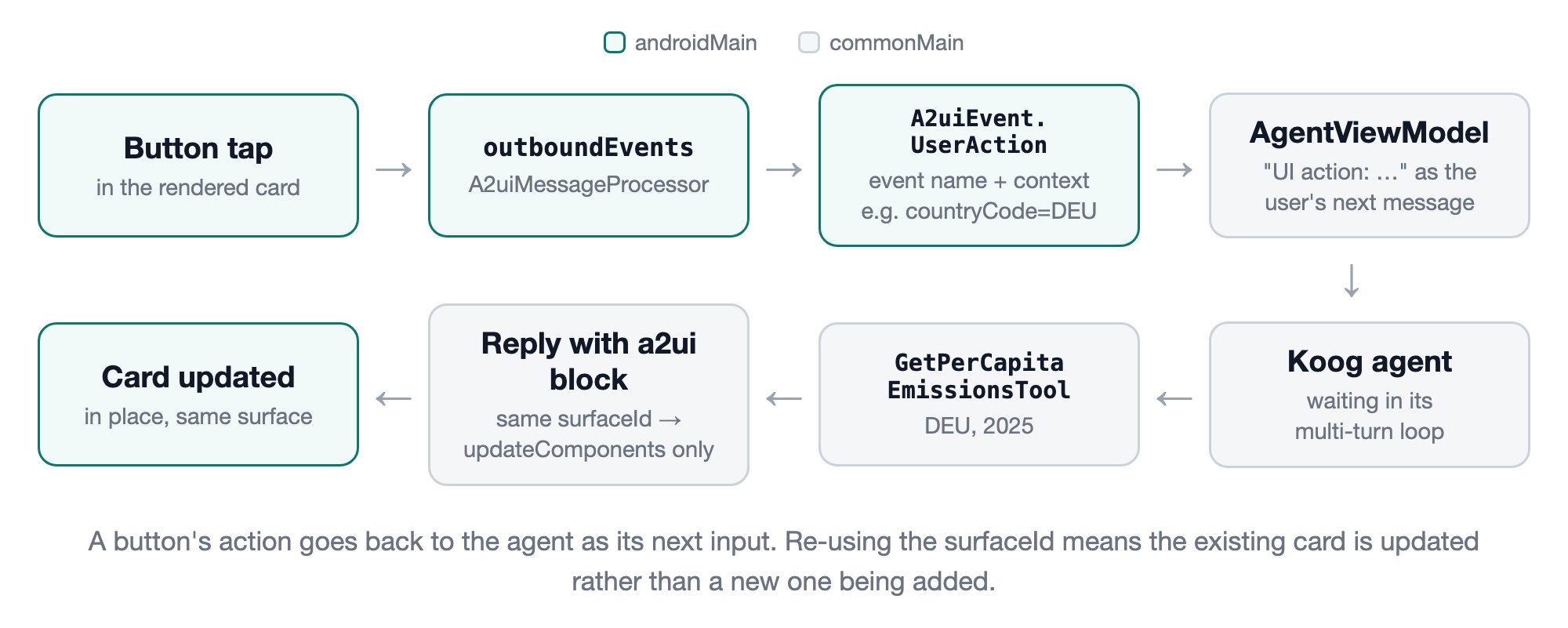
The following shows how the various pieces fit together (we’ll go through each of these below).
Implementation
We firstly add the following dependencies. The Material 3 library includes an implementation of the A2UI “basic catalog” (Text, Row, Column, Card, Button etc).
libs.versions.toml
1
2
3
4
5
6
a2ui = "1.0.0-alpha01"

a2ui-model = { module = "androidx.a2ui:a2ui-model", version.ref = "a2ui" }
a2ui-compose-runtime = { module = "androidx.a2ui.compose:compose-runtime", version.ref = "a2ui" }
a2ui-compose-ui = { module = "androidx.a2ui.compose:compose-ui", version.ref = "a2ui" }
a2ui-material3 = { module = "androidx.compose.material3:material3-a2ui", version.ref = "a2ui" }
build.gradle.kts
1
2
3
4
5
6
7
androidMain.dependencies {
    ...
    implementation(libs.a2ui.model)
    implementation(libs.a2ui.compose.runtime)
    implementation(libs.a2ui.compose.ui)
    implementation(libs.a2ui.material3)
}
As the agent code is in commonMain we need some way for it to talk to the (Android only) renderer. We do that using the following interface. The Android implementation is bound using Koin in the Android specific dataModule() and the other platforms bind an UnsupportedA2uiRenderer object (where isSupported is false).
1
2
3
4
5
6
7
8
9
10
11
12
13
interface A2uiRenderer {
    val isSupported: Boolean
    val catalogId: String
    val catalogSchema: String
    val surfaceIds: StateFlow<List<String>>
    val events: Flow<A2uiEvent>

    fun process(messageJson: String)
    fun reportError(message: String)

    @Composable
    fun Surface(surfaceId: String, modifier: Modifier)
}
The Android implementation then creates the catalog (we’ll come back to how we’re extending that with our own components later), along with an A2uiMessageProcessor which does the actual work of processing the A2UI messages and managing the resulting “surfaces” (a surface being a piece of UI generated by the agent).
1
2
3
4
5
6
7
8
9
10
11
12
13
14
15
16
17
18
19
20
21
22
23
24
25
26
27
28
29
30
31
32
33
34
35
36
37
38
39
40
41
42
43
44
45
46
47
48
class AndroidA2uiRenderer(context: Context) : A2uiRenderer {
    private val basicCatalog = materialA2uiBasicCatalogV1(
        image = MaterialA2uiBasicCatalogV1Defaults.image { url, contentDescription, contentScale, modifier, onError ->
            AsyncImage(model = url, contentDescription = contentDescription, ...)
        },
        ...
    )

    private val catalog = A2uiCatalog(
        catalogId = "https://github.com/joreilly/ClimateTraceKMP/a2ui/catalog/v1",
        components = basicCatalog.components + climateTraceA2uiComponents,
        functions = basicCatalog.functions,
        themeSchema = basicCatalog.themeSchema,
    )

    private val processor = A2uiMessageProcessor(catalogs = listOf(catalog))
    private val parser = A2uiMessageParser()

    private val scope = CoroutineScope(SupervisorJob() + Dispatchers.Default)

    init {
        scope.launch { processor.collectMessages() }
    }

    override val isSupported = true
    override val catalogId: String = catalog.id
    override val catalogSchema: String by lazy { catalog.toJsonSchemaString() }

    override fun process(messageJson: String) = processor.processInput(parser, messageJson)

    override fun reportError(message: String) = processor.processError(
        A2uiClientErrorMessage(
            code = "VALIDATION_FAILED",
            surfaceId = "__global__",
            message = message,
            context = mapOf("path" to "/"),
        )
    )

    @Composable
    override fun Surface(surfaceId: String, modifier: Modifier) {
        val surfaces by processor.activeSurfaces.collectAsState()
        val surface = surfaces.firstOrNull { it.id == surfaceId } ?: return
        A2uiSurface(surfaceModel = surface, modifier = modifier.fillMaxWidth())
    }

    ...
}
Any errors, either when parsing a message or later when its components are validated against the catalog schema, are emitted by the processor on outboundEvents (reportError() lets us report our own errors the same way). Like user actions, we send those back to the agent as its next input so it can correct them.
Getting A2UI from the agent
The agent’s system prompt tells it that the device can display UI and that, when it makes sense, it should include A2UI messages in its final reply in a fenced code block marked a2ui (followed by a short text summary). Importantly the prompt also includes the JSON Schema for our catalog (generated for us by the library using toJsonSchemaString()) and that’s how the LLM knows what components are available and what properties they support.
1
2
3
4
5
6
7
8
9
10
11
12
13
14
15
16
17
18
19
20
21
22
23
24
25
26
fun a2uiInstructions(renderer: A2uiRenderer) =
    """
    The user's device can display native UI. When an answer contains data that suits a visual layout
    (comparisons, rankings, several countries or years), include the UI in your final reply as A2UI
    protocol messages in a single fenced code block marked a2ui, followed by a one or two sentence text
    summary rather than repeating the data. For example:

    ```a2ui
    [{"version":"v0.9","createSurface":{"surfaceId":"<id>","catalogId":"${renderer.catalogId}"}},
     {"version":"v0.9","updateComponents":{"surfaceId":"<id>","components":[...]}}]
    ```

    The block is a JSON array of messages. Send createSurface only for a new surface (use a new
    surfaceId for each new piece of UI). To change UI that's already shown, send only
    updateComponents with its surfaceId.
    Components are a flat list; each has a unique "id" and a "component" type name plus that
    component's properties. Containers reference their children by id. Exactly one component must
    have the id "root" - it is the top of the layout.
    Give text properties as plain literal strings with numbers already formatted - don't use
    ${'$'}{...} expressions or function calls in them.
    A Button has a "child" (the id of a Text component for its label) and an "action" of the form
    {"event":{"name":"<action name>","context":{"<key>":"<literal value>"}}}.
    ...

    The available components and their properties are defined by this JSON Schema:
    """.trimIndent() + "\n" + renderer.catalogSchema
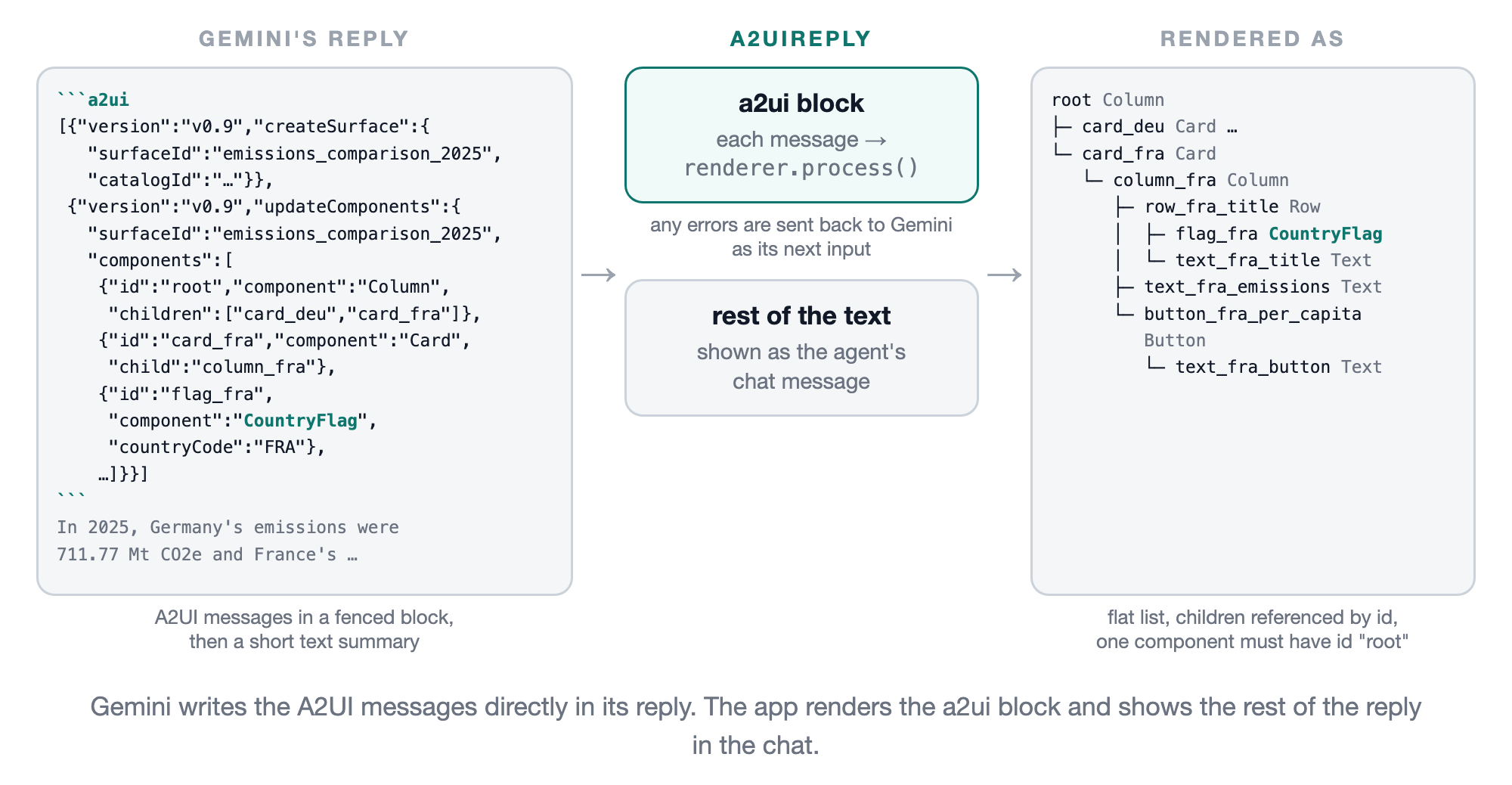
When the agent has finished calling tools we then pull that block out of the reply, send each of the messages in it to the renderer, and use the rest of the text as the message shown in the chat.
1
2
3
4
5
6
7
8
9
10
11
12
13
14
15
16
17
18
19
20
21
object A2uiReply {
    private val blockRegex = Regex("```a2ui\\s*\\n(.*?)```", RegexOption.DOT_MATCHES_ALL)

    fun render(reply: String, renderer: A2uiRenderer): String {
        blockRegex.findAll(reply).forEach { renderBlock(it.groupValues[1].trim(), renderer) }
        return blockRegex.replace(reply, "").trim()
    }

    private fun renderBlock(block: String, renderer: A2uiRenderer) {
        val messages = try {
            Json.parseToJsonElement(block) as? JsonArray
        } catch (e: Exception) {
            null
        }
        if (messages == null) {
            renderer.reportError("the a2ui block is not a valid JSON array of A2UI messages")
            return
        }
        messages.forEach { renderer.process(it.toString()) }
    }
}
That’s called from the agent’s existing strategy loop.
1
2
3
4
5
6
7
8
9
// No more tool calls — extract the assistant's final text response.
assistantMessage = response.textContent()

if (a2uiRenderer.isSupported) {
    assistantMessage = A2uiReply.render(assistantMessage, a2uiRenderer)
}

// Deliver the response to the UI and suspend until the user replies.
inputMessage = onAssistantMessage(assistantMessage)
This shows an example of what that looks like for the cards example shown later.
Showing the UI
In AgentViewModel we observe surfaceIds and add a new UiMessage to the list of chat messages when a surface is created. The reply’s text gets added to the chat before the surface it describes has been created (the messages are processed asynchronously) so we insert the UI above that summary.
1
2
3
4
5
6
7
8
9
10
11
12
13
14
15
16
17
18
viewModelScope.launch {
    val shown = mutableSetOf<String>()
    a2uiRenderer.surfaceIds.collect { ids ->
        val newIds = ids.filter { shown.add(it) }
        if (newIds.isNotEmpty()) {
            _uiState.update { state ->
                val uiMessages = newIds.map { id -> Message.UiMessage(id) }
                val last = state.messages.lastOrNull()
                val messages = if (last is Message.AgentMessage) {
                    state.messages.dropLast(1) + uiMessages + last
                } else {
                    state.messages + uiMessages
                }
                state.copy(messages = messages)
            }
        }
    }
}
And then in our (shared) chat UI we just call Surface() for those messages.
1
2
3
4
5
6
7
8
items(messages) { message ->
    when (message) {
        is Message.UserMessage -> UserMessageBubble(message.text)
        is Message.AgentMessage -> AgentMessageBubble(message.text)
        ...
        is Message.UiMessage -> a2uiRenderer.Surface(message.surfaceId, Modifier)
    }
}
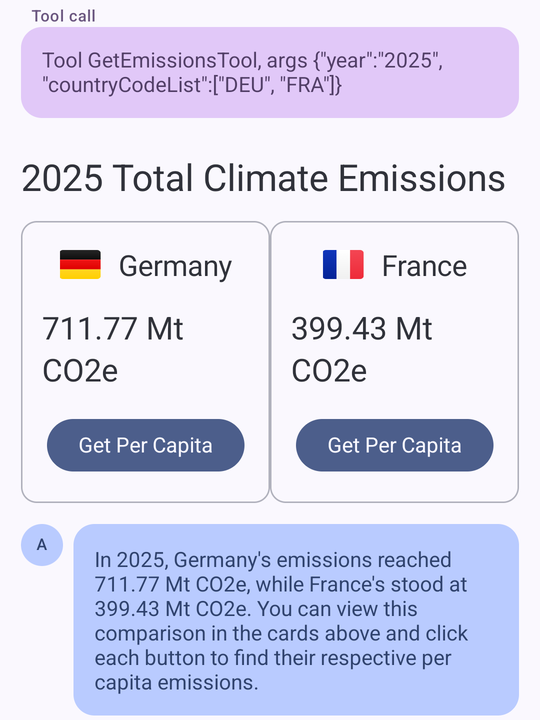
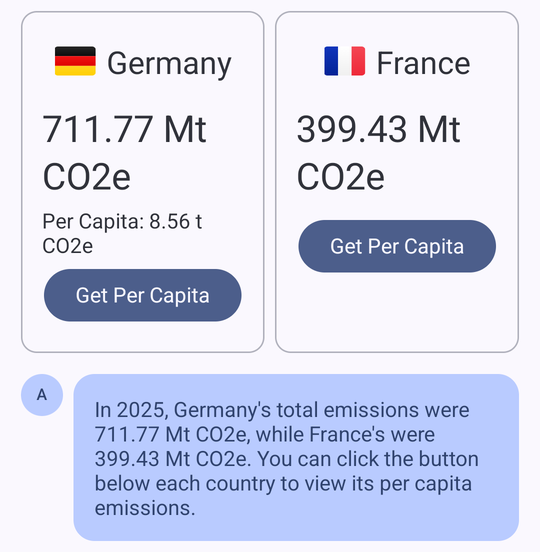
This is the UI that was generated for the prompt “Show the 2025 emissions of Germany and France as cards, with a button under each to get its per capita emissions”.
Handling user actions
When the user presses one of those buttons the processor emits an event on outboundEvents (which we map to A2uiEvent.UserAction in AndroidA2uiRenderer). The agent in this project already has a multi-turn loop where it waits for the user’s next message so we can just pass the action in as that next message.
1
2
3
4
5
6
7
8
9
10
11
12
13
14
15
16
17
viewModelScope.launch {
    a2uiRenderer.events.collect { event ->
        when (event) {
            is A2uiEvent.UserAction -> if (_uiState.value.userResponseRequested) {
                _uiState.update {
                    it.copy(
                        messages = it.messages + Message.SystemMessage("UI action: ${event.description}"),
                        isLoading = true,
                        userResponseRequested = false,
                        currentUserResponse = "UI action: ${event.description}"
                    )
                }
            }
            is A2uiEvent.Error -> ...
        }
    }
}
The full round trip then looks like this.
In the following, after pressing the Germany button, the agent fetched the per capita data and then replied with an a2ui block containing just an updateComponents message for the same surfaceId. This resulted in the existing card being updated (with the per capita value added to it) rather than a new one being added.
Custom components
The basic catalog includes a lot of the standard UI components but there’s nothing in it for example for showing a chart. The library does however allow us to add our own components. We’ve added two here, CountryFlag and EmissionsChart, and this is the implementation of CountryFlag (using the same FlagKit flags we use elsewhere in the app).
1
2
3
4
5
6
7
8
9
10
11
12
13
14
15
16
17
18
object CountryFlagComponent : A2uiComponent {
    private val countryCode = A2uiProperty.string(
        "countryCode",
        required = true,
        description = "ISO 3166-1 alpha-3 country code, e.g. 'DEU'."
    )

    override val name = "CountryFlag"
    override val description =
        "Shows the national flag of a country. Use it next to a country's name, e.g. in a card title " +
            "Row with \"align\": \"center\"."
    override val properties = listOf(countryCode)

    @Composable
    override fun A2uiComponentScope.Content(properties: A2uiComponentProperties, modifier: Modifier) {
        FlagImage(properties[countryCode].orEmpty(), modifier.size(width = 32.dp, height = 22.dp))
    }
}
EmissionsChart works in the same way, with a nestedList property for the bars (each having a label, value and optional country code). Those descriptions and properties are included automatically in the generated JSON Schema so we didn’t have to add anything component specific to the prompt. As shown earlier, we then create our own catalog that includes these along with the basic catalog components.
As well as adding components we can also replace the implementation of any of the basic catalog ones. One issue I ran into was with a Row of cards like the ones above….after Germany’s card was updated it was shorter than the France one. The basic catalog Row supports "align": "stretch" but that didn’t help here as the cards are shown in the chat’s scrolling list (where the height is unbounded). To fix that we pass our own Row to materialA2uiBasicCatalogV1(row = EqualHeightRow) which, for stretch, uses Modifier.height(IntrinsicSize.Min) and has each child fill that height (and just uses the library’s Row otherwise). We then also added a line to the prompt asking it to use "align": "stretch" for rows of cards.
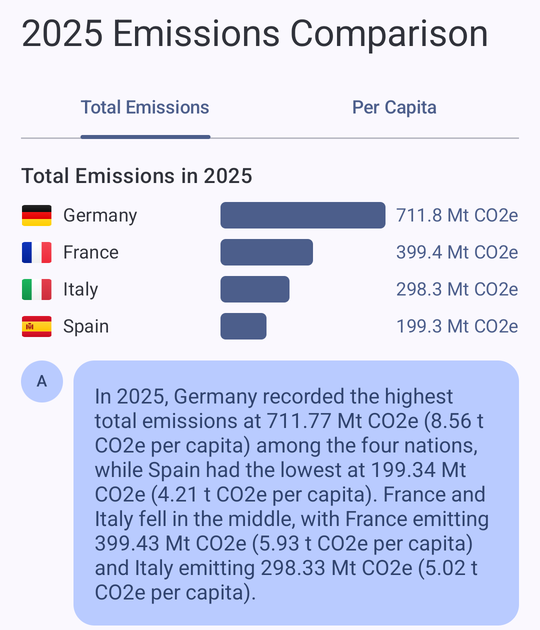
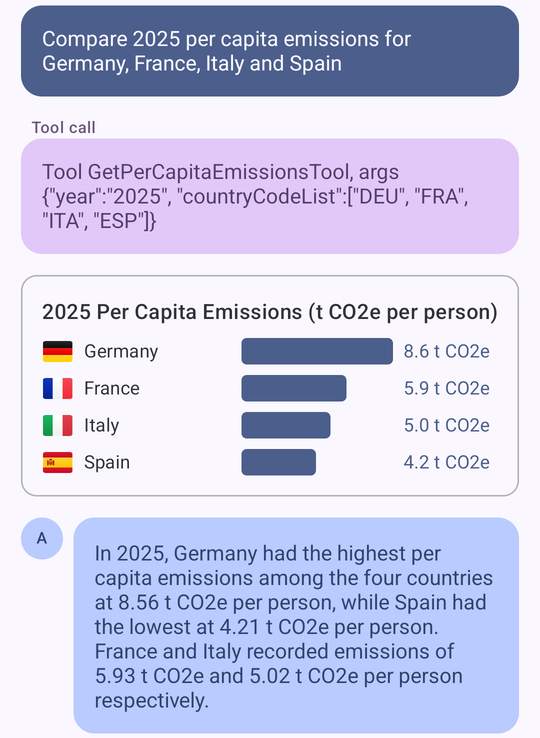
This is the chart that’s generated for “Compare 2025 per capita emissions for Germany, France, Italy and Spain”.
And for “Compare 2025 emissions for Germany, France, Italy and Spain” Gemini decided to also make use of the basic catalog’s Tabs component, with a chart for total emissions and another for per capita emissions (switching between tabs is handled locally without needing to go back to the agent).