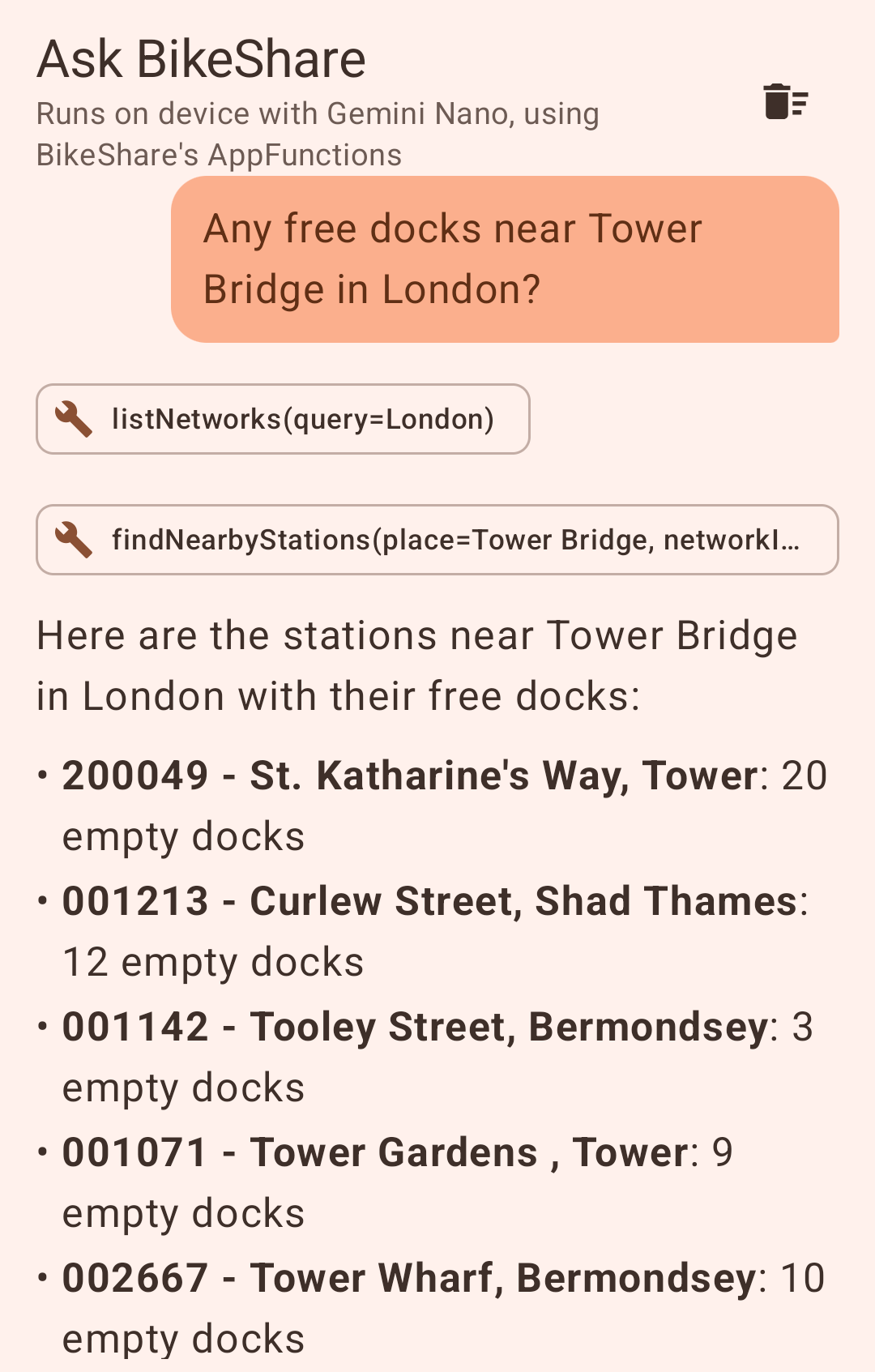
In a recent article we looked at using AppFunctions to expose functionality in the Confetti app to AI agents running on the device. I had also added AppFunctions support to the BikeShare sample, exposing three functions: listNetworks, listStations and findNearbyStations. Google recently released an ML Kit GenAI agent API which lets you run an AI agent on the device using Gemini Nano, with your app’s AppFunctions as its tools. Given BikeShare already had those, I thought it would be a good opportunity to try it out. This article outlines the changes made to add an “Ask BikeShare” chat to the Android app.
Dependencies
libs.versions.toml
[versions]
...
androidxAppFunctions = "1.0.0-alpha13"
mlkitGenaiAgent = "1.0.0-alpha1"

[libraries]
...
mlkit-genai-agent = { module = "com.google.mlkit:genai-agent", version.ref = "mlkitGenaiAgent" }
Implementation
Creating the agent itself only needs a few lines of code. enableAppFunctions(true) tells it to discover the AppFunctions in the app’s own package and use those as its tools (so there’s no need to define those tools separately).
private val agent = Agent.builder()
    .setName("BikeShare")
    .setInstructions(INSTRUCTIONS)
    .enableAppFunctions(true)
    .setMaxTurns(8)
    .build()
The instructions ended up mostly being about which tool to call when.
val INSTRUCTIONS = """
    You help people find shared bikes and free docks using BikeShare's tools.
    Never invent networks, stations or numbers: look them up with the tools.
    To answer about a city, first find its network ID with listNetworks, then use
    listStations or findNearbyStations with that ID.
    Keep answers short: name the stations and say how many bikes and free docks each has.
    For the stations with the most free bikes or empty docks, call listStations with
    sortBy ("freeBikes" or "emptyDocks") and limit 5, and keep the order it returns.
    For stations near a named place, call findNearbyStations with that place's name as
    place. Never guess latitude and longitude.
""".trimIndent()
The agent is run from a ViewModel using an AgentRunner and an AgentSession (which keeps track of the conversation history). runAsync() returns a flow of events: FunctionCall and FunctionResponse as tools get called, and TextMessage as the answer streams in. We use the FunctionCall events to show a chip for each tool call under the answer.
val session = AgentRunner(getApplication(), agent).getOrCreateSession(SESSION_ID)
session.runAsync(Content.builder().text(text).build()).collect { event ->
    _messages.update { it.withAgentEvent(event) }
}
Before any of that we check that Gemini Nano is actually available using Generation.getClient().checkStatus() (downloading the model if needed). The “Ask” button only appears once that succeeds, so on devices that don’t support it the app looks exactly as it did before.
Gemini Nano also answers in Markdown, so the replies are rendered using the same multiplatform-markdown-renderer library we use in Confetti.
One useful thing about the tools being AppFunctions is that you can also call them directly using adb, which I used to check the agent’s answers.
adb shell "cmd app_function execute-app-function --package dev.johnoreilly.bikeshare \
--function 'dev.johnoreilly.bikeshare.functions.BaseBikeShareAppFunctionService#listStations' \
--parameters '{\"networkId\":\"citi-bike-nyc\",\"sortBy\":\"freeBikes\",\"limit\":5}' --brief-yaml"
The code shown here is part of the androidApp module in the BikeShare repository.