FormAI is a Kotlin Multiplatform app that analyses a video of your golf swing, basketball shot or running form and gives you coaching feedback. Up to now that has always meant uploading the video to Gemini and getting the response back over the network. We’ve added an option to do the golf swing analysis entirely on an Android device instead, using a small Gemma 4 model that we fine-tuned to imitate Gemini for that one task. LiteRT-LM, the runtime we use for this, is itself cross platform (Android, iOS, desktop and web), but we’ve only wired up the Android side so far, so this path lives in androidMain and the other targets report it as unavailable and fall back to the cloud.
I’ve used on-device AI in a sample before, in OnDeviceAI, but that one uses whatever model the platform already provides (Apple’s Foundation Models framework on iOS, ML Kit’s Prompt API on Android) and you don’t really get a say in what it knows. This is the opposite end of that: we’re supplying the model ourselves, and training it on what we want it to be good at.
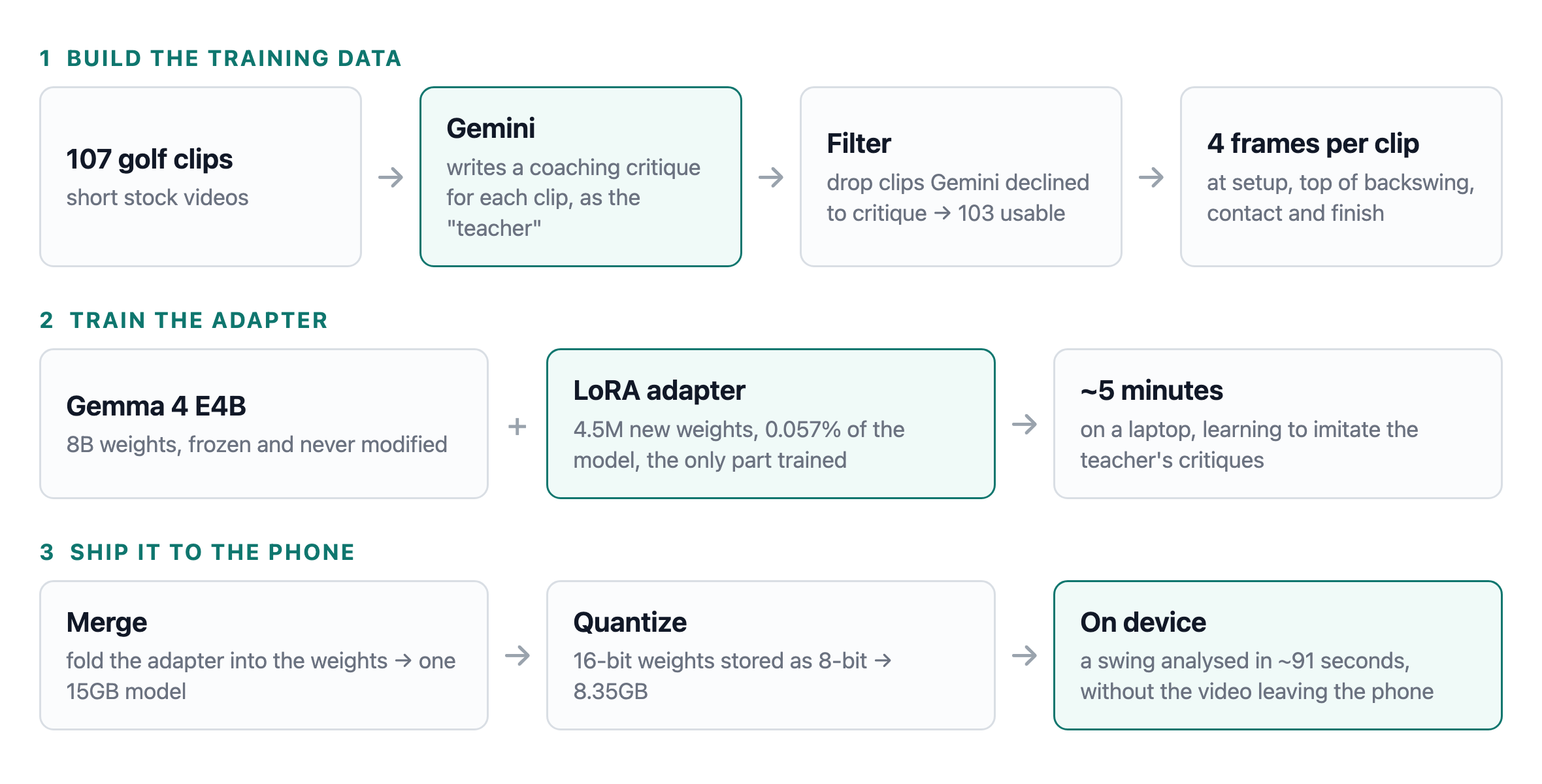
In this article we’ll look at how that’s put together: using Gemini as a teacher to build the training data, fine-tuning Gemma 4 E4B with LoRA, converting the result for Android’s on-device runtime, and what it costs in practice. There’s a much more detailed write-up of the same work in a separate post if you want the full engineering log.
Why fine-tune anything
Gemma 4 E4B is small enough to run on a phone, but out of the box it gives fairly generic swing advice. The goal then isn’t really to run a model on a phone, it’s to get a small model to behave like a big one for this one narrow task, and the usual approach for that is distillation: use the large model as a teacher to generate the training data, then train the small model to imitate it.
Building the training set
The app already sends each video to Gemini with an activity-specific prompt. To build a training set we need that same call run in bulk over a folder of clips, so that became a small standalone tool, dataset-bootstrap, which walks a directory of clips and writes out the responses as JSONL.
Each clip gets two Gemini calls instead of one. The first asks for the critique as plain text, and the second asks only for the timestamps of four moments in the swing (setup, top of the backswing, contact and finish) against a small JSON schema. Keeping them separate matters because asking for rigid JSON and good prose in the same response seems to make the prose worse.
Main.kt
val text = callGeminiForCritique(client, args.apiKey, mimeTypeFor(clip), base64, prompt)
val keyframeTimestamps = callGeminiForKeyframes(client, args.apiKey, mimeTypeFor(clip), base64)
From video to frames
Gemini takes the video directly, but the fine-tuning tooling for Gemma 4 takes still images, so each clip is reduced to four frames.
Which four matters, because evenly spacing them across the clip breaks down on a 27 second video where the swing itself takes two seconds and the result is four frames of someone standing still. Instead we use the keyframe timestamps from the second Gemini call and take a frame at each named moment, filling in extra evenly spaced frames if the window is long enough to need them.
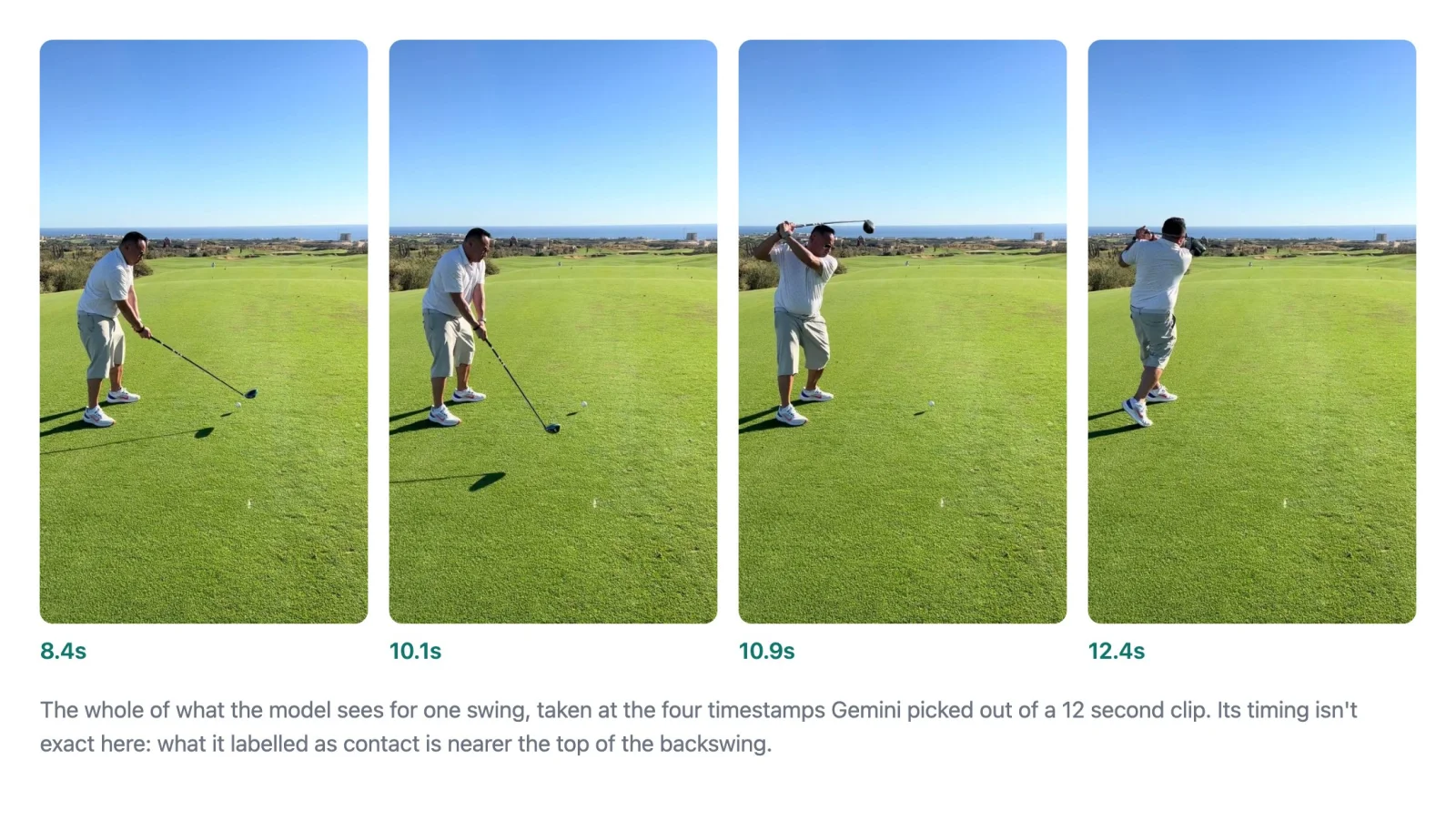
As the caption suggests, those timestamps are approximate. Asked when contact happens, Gemini is routinely half a second or more out, which on a swing is the difference between the top of the backswing and the ball already gone. Newer and larger models are no better at it, which suggests the limit is how sparsely they sample video rather than how well they reason about it. The engineering log has the measurements.
Note that we used four frames as more didn’t fit. Every frame adds to what training has to hold in memory at once, and a four-frame run already peaks at around 40GB of the laptop’s 64. Doubling it ran out before the first step finished, so four is where this stops for now.
There’s an obvious cost to this too, in that the teacher watched the video where the student only ever sees four stills.
Training the adapter
Fine-tuning means taking a model that already exists and nudging its weights a little, so that it keeps everything it learned during pre-training but starts producing answers more like the examples we give it. Gemma 4 E4B has around 8 billion of those weights, though about a third of that is a single large embedding table that the model only ever looks rows up in rather than doing maths across, so it can sit in slower memory. That’s what the “E4B” name is getting at: roughly 4.5 billion parameters are doing the heavy lifting. Nudging all of them is impractical on a laptop, because training doesn’t just need the weights. It needs a second number for every one of them recording which way it should move, plus more that the training process keeps as it goes, which comes to several times the model’s own file size.
LoRA (Low-Rank Adaptation) gets around that. The original weights are frozen, meaning they’re used to compute answers but never modified, and alongside each layer we want to adapt we add a pair of much smaller matrices that start at zero, and only those get trained. When the model is actually being used, its output is whatever the frozen layer produces plus whatever the small pair produces, so the pair ends up learning a correction to the original instead of replacing it.
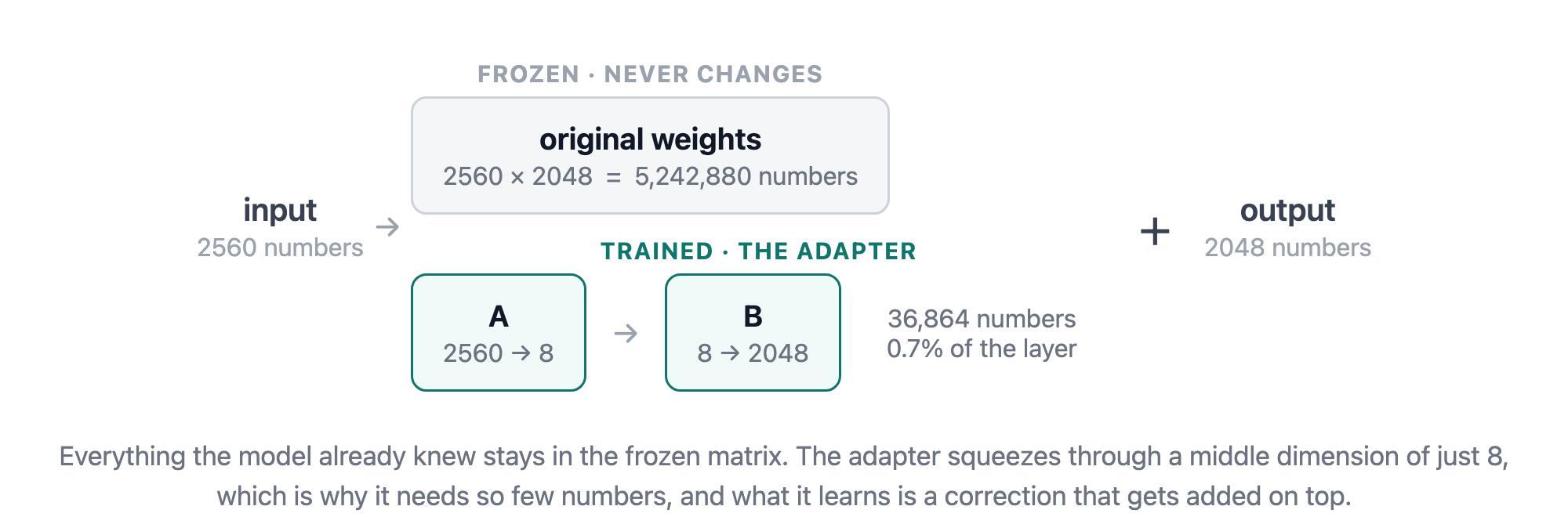
The reason the pair can be so much smaller is the “low-rank” part, in that instead of learning a full-size grid of adjustments we learn two thin ones that multiply together to produce a grid of the right size, in our case squeezing through a middle dimension of 8. Most possible updates can’t be expressed that way, so it is a genuine limitation, but it turns out to be enough when the job is narrowing what a model does and not teaching it new knowledge. Here it comes to 4,538,368 trainable parameters out of 7,945,639,200, or 0.057% of the model, which is what makes this run on a laptop at all.
We apply it to the attention projections (q_proj, k_proj, v_proj and o_proj), which are the parts of each layer that decide what the model pays attention to when producing the next word. That’s the usual choice for LoRA, and it’s where adapting has most effect per parameter.
The training side is a small Python toolchain.
mlx: Apple’s array framework, and what the training loop actually runs on.mlx-vlm: the vision-language layer on top of MLX, which provides the LoRA trainer and the dataset handling for examples that are images plus text.peft: Hugging Face’s parameter-efficient fine-tuning library. We don’t train with it, but it defines the adapter file format and does the merge at the end.transformers: loads Gemma 4 and its processor for that merge step.torch: whatpeftandtransformersrun on.safetensors: the format the adapter is stored in, and what we read and write when converting an MLX adapter into the layoutpeftexpects.
train_lora_mlx.py
TARGET_MODULES = ["q_proj", "k_proj", "v_proj", "o_proj"]

model = get_peft_model(
    model,
    TARGET_MODULES,
    rank=8,
    alpha=16,
    dropout=0.05,
)
rank is that middle dimension, and alpha scales how strongly the learned correction is applied relative to it, so the two are usually set together (8 and 16 here, a common starting pair). Naming the four projections explicitly matters too, because mlx-vlm would otherwise attach an adapter to every layer it can, including the much larger ones that sit between the attention blocks. That takes the adapter from about 4.5 million trainable parameters to over 18 million, for a job that doesn’t need them.
Training works through the examples one at a time, each one a step, and goes over the whole corpus twice (two epochs). That’s a little over 200 steps at a second or two each, so a full run finishes in about five minutes on the laptop. MLX being designed for Apple Silicon from the start makes a large difference to that (roughly fifty times faster per step); the engineering log has the measured comparison against the more usual toolchain.
Note that the learning rate, which controls how big an adjustment each step makes, needs to be much lower than the examples suggest. Training reports a loss figure measuring how far the model’s output is from the teacher’s, and you want it falling gradually. The 2e-4 that most LoRA tutorials use sends it to near zero within nine steps here, which sounds ideal but means the model has memorised the training set instead of learning from it, and it then generates the word “model” five hundred times in a row. 2e-6 gives a gradual curve and coherent output.
Merging and converting
Training gives you an adapter alongside the base model. For the Android runtime we want a single file, so the adapter is merged into the base weights and saved as a single standalone copy of the model.
That merged copy is around 15GB, which is far more than we want to put on a phone, so it then gets quantized and converted to the .litertlm format Android’s runtime loads.
Quantizing just means storing each weight in fewer bits. They come out of training as 16-bit numbers, and rewriting each one as an 8-bit integer roughly halves the file, at the cost of some precision, since every weight now has to round to one of 256 possible values instead of 65,536. That’s what the dynamic_wi8_afp32 recipe means: the weights become 8-bit integers, while the numbers moving through the model as it runs stay at full precision.
python -m litert_torch.generative.export_hf \
  ./merged/golf-swing-v9 \
  ./litert/golf-swing-v9 \
  --task=image_text_to_text \
  --quantization_recipe=dynamic_wi8_afp32
That gives an 8.35GB file. There’s a more aggressive recipe that goes down to 4 bits and halves it again, and Google ship a 4-bit build of the base model that works fine. Ours didn’t survive the same treatment. With only 16 possible values to round to, the small numbers are the ones that get lost, and the behaviour we trained lives entirely in small adjustments layered on top of the base weights. At int4 the model produces repetition loops (“the swing is balanced and balanced”) and invented detail. We tried again after tripling the corpus and got the same result.
Running it on Android
The Android side uses LiteRT-LM (com.google.ai.edge.litertlm:litertlm-android) rather than MediaPipe’s tasks-genai, which is in maintenance-only mode.
AndroidOnDeviceAnalysisService.kt
val engine = Engine(
    EngineConfig(
        modelPath = modelFile.absolutePath,
        backend = backend,
        visionBackend = backend,
        maxNumTokens = MAX_TOKENS,
        maxNumImages = images.size,
        cacheDir = context.cacheDir.absolutePath
    )
)
There are a couple of things to watch out for here. Training used a fixed four frames per clip, but the app scales the count to the length of the video it’s given, so a longer swing gets a few more. Models work in tokens, roughly word fragments, and maxNumTokens is the budget for everything the model handles at once, the images and prompt going in as well as the text coming out, not just the response. Gemma spends around 256 tokens on each image, so even four frames is about 1,024 before any text at all; we set it to 4096, which is the model’s own declared maximum.
We try Backend.GPU() first and fall back to Backend.CPU(). Running on the GPU means going through OpenCL, an open standard for putting general computation on a GPU, which on Android comes as a library the chip maker supplies rather than as part of the OS, so it isn’t present on every device.
That library also needs declaring in the app manifest. Android 12 and later require an app to name any vendor-supplied native library before it can load it, and the LiteRT-LM AAR names none, so without these three lines the GPU path quietly falls back to a slower one.
<uses-native-library android:name="libOpenCL.so" android:required="false" />
<uses-native-library android:name="libOpenCL-pixel.so" android:required="false" />
<uses-native-library android:name="libOpenCL-car.so" android:required="false" />
There’s no download flow yet, so the model file is pushed onto the device by hand and the on-device toggle only appears in settings once it’s there.
adb push model.litertlm /sdcard/Android/data/<applicationId>/files/model.litertlmHow long it takes
On a Pixel 10 Pro XL an analysis takes about 91 seconds on the GPU. Of that, 9 seconds is loading the model and 83 is generating. Time scales almost linearly with the number of characters produced, so the way to make it faster is to have it write less. We do that by asking Gemini for concise critiques when building the training data, so brevity is something the model learned, instead of telling the small model to be brief when it runs.
The first run after installing a new model file is slower, at around 154 seconds, because LiteRT-LM compiles the model’s GPU programs the first time it sees a file and caches them (69 of those seconds are the cache build; generation is unchanged). After that it’s consistent, and repeated runs produce byte-identical output.
The same .litertlm file also runs on a laptop through the litert-lm CLI, which is a good way to test before touching a phone. On an M5 Max that’s about 6.6 seconds on the GPU and 16.6 seconds on CPU, so the laptop GPU is roughly 14 times faster than the phone’s.
For comparison the cloud path takes about 12 seconds end to end on the same phone and clip, of which 3.5 seconds is compressing the video and 8.4 is the round trip to Gemini.
How the output compares
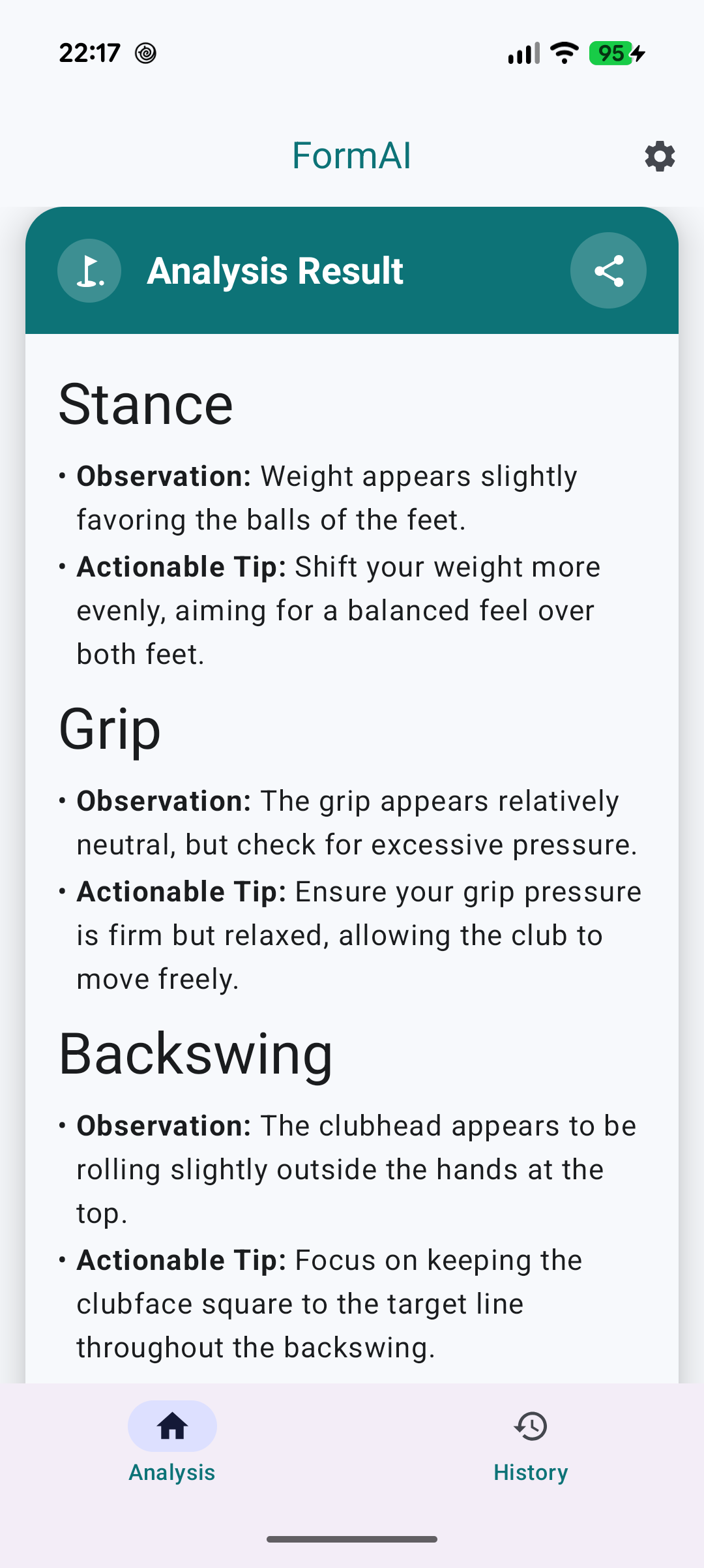
To compare them fairly we gave both paths the same clip and the same prompt. The structure that comes back is much the same, with both producing six phases with an observation and a tip in each, at around 1,400 characters.
The content is where they differ. On the downswing the fine-tuned model says “the transition from backswing to downswing seems slightly rushed”, where Gemini says “an ‘over-the-top’ move occurs, causing the clubhead to approach the ball from an outside-in path”. On impact it’s “the clubhead seems to be slightly ahead of the center of the body” against “weight remains too far back on the trailing foot, resulting in a thin, inconsistent strike”. That pattern holds across all six phases: the smaller model describes what things look like, Gemini names the fault and its consequence. They occasionally contradict each other outright, and Gemini is the more reliable of the two given it watched twelve seconds of video where the other saw five stills.
One result that was more encouraging: one of the clips we kept back from training turned out to be a putting stroke and not a full swing, and the fine-tuned model recognised that, dropped the six-phase template it had been trained on, and talked about tempo and pendulum motion instead. So it isn’t just stamping the training format onto whatever it’s given.
One rough edge is still there. The on-device response stops mid-sentence, with no closing full stop, and it isn’t running out of room: the model is choosing to end its turn early. We assumed that was a data-volume problem, so growing the corpus by two thirds was partly a test of that, and it made no difference at all. Whatever causes it, more of the same data doesn’t fix it.
That matched prompt is only for the comparison, though. In the app the two deliberately differ, because the length and formatting spec the small model was trained on also constrains Gemini, which writes about 2,150 characters when left alone against 1,470 when held to the template. There’s no reason to make the cloud path worse just to keep the two comparable.
The on-device path is a privacy and offline feature rather than a faster or better one. It’s also still a prototype: one activity type, 103 training examples, and an 8.35GB file that has to be side-loaded.
Featured in Android Weekly #743
Related tweet
Running golf swing analysis on an Android device with a fine-tuned Gemma 4 model https://t.co/K8gCzixoZb @googlegemma
— John O'Reilly (@joreilly) September 1, 2026
More work to do but seems promising....and cool in general to see how this technique can work! Think we'll see more and more examples of use of on-device LLMs.