In an earlier article we added semantic search to the Koog-based AI agent in the Confetti Compose Multiplatform sample. That used Gemini both for the LLM driving the agent and for the embeddings behind the session search. Google recently announced EmbeddingGemma 2, a small embedding model designed to run on-device, and in this article we’ll look at using it to compute those embeddings on the phone instead (with Gemini still driving the agent), first on the CPU and then on the Tensor G5 NPU in a Pixel 10 Pro XL.
TL;DR: EmbeddingGemma 2 can be used as a Koog Embedder with very little code. On the Tensor G5 NPU it built the semantic index for droidcon London 2026 (63 sessions) in about 6 seconds, vs about 19 seconds on the CPU, using around 70 MB of native memory (vs ~460 MB). After that, each search only needs to embed the query.
A quick recap on embeddings
An embedding is a list of numbers (a vector) that represents the meaning of a piece of text. It’s produced by a model trained so that text with similar meaning ends up with similar vectors, even when there are no words in common. That’s what lets the agent answer a question like “any talks about making apps faster?” with a session titled “Where Did the Time Go? Debugging Android Performance with Traces”, which a keyword search would miss.
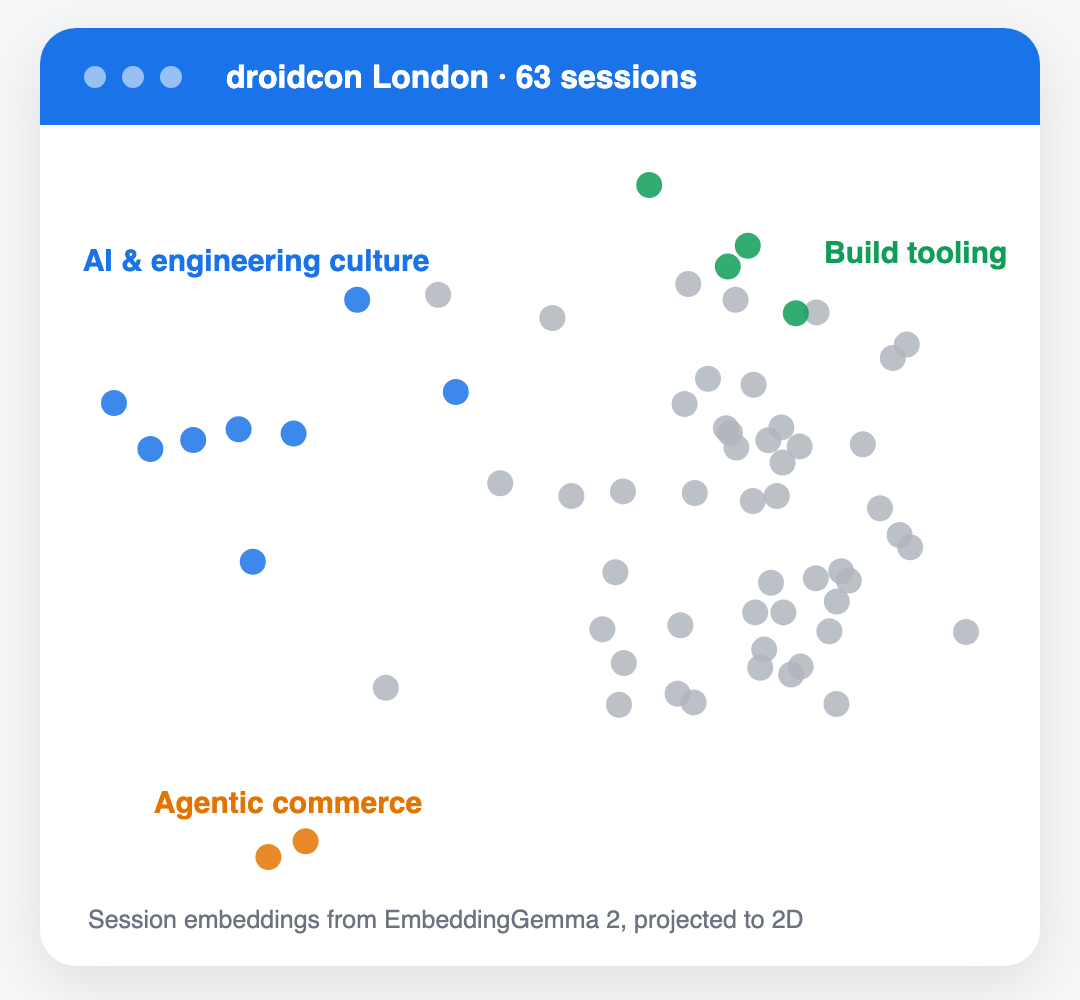
To give an idea of what that looks like, the chart below takes the EmbeddingGemma 2 vectors for the 63 droidcon London 2026 sessions (768 numbers each) and projects them down to two dimensions. Sessions with similar meaning end up near each other, for example the talks about AI and engineering culture on the left, and the build tooling talks at the top.
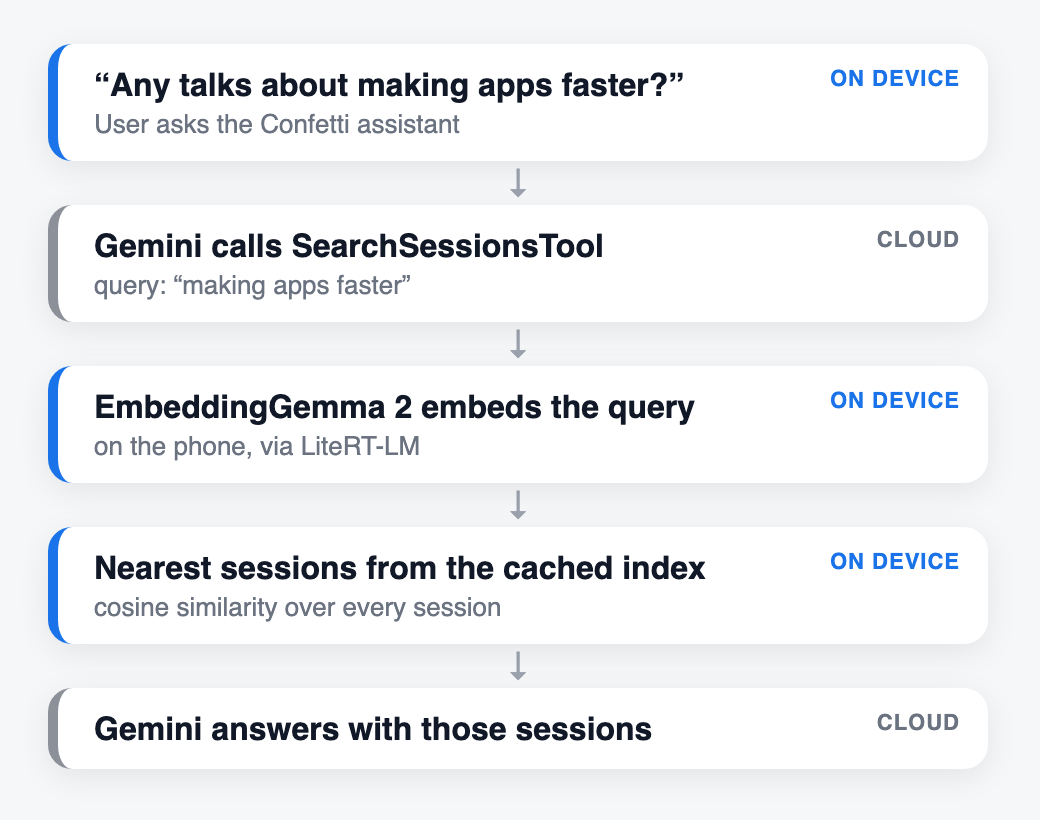
In Confetti every session is embedded the first time the agent searches, and the vectors are cached in an index. When the agent calls its SearchSessionsTool, the query is embedded too, and the sessions whose vectors are closest to it (by cosine similarity) are returned to the LLM. This is the retrieval part of RAG (Retrieval-Augmented Generation): giving the model the relevant parts of your own data at the point it needs them.
Doing the embedding on the device means that building the index and running each search no longer need an embeddings API call (there would otherwise be two per session and one per query). The only cloud calls left are the ones to Gemini for the agent itself.
Setup
Everything was run on a Pixel 10 Pro XL (Tensor G5, Android 17) using LiteRT-LM 0.18.0, Google’s on-device runtime for language models. The model (~165 MB) isn’t bundled with the app. It’s downloaded from Hugging Face and pushed to the app’s external files directory, and the app falls back to Gemini embeddings if it’s not there.
adb push embeddinggemma-2-text-270m.litertlm \
  /sdcard/Android/data/dev.johnoreilly.confetti/files/
This is Android only for now. LiteRT-LM itself is cross platform, but the code below lives in androidMain and the other targets keep using Gemini.
Implementation
We start by adding the LiteRT-LM dependency to the shared module’s androidMain source set. As well as running LLMs, litertlm-android now includes an EmbeddingEngine API for embedding models like EmbeddingGemma 2 (added in 0.17.0), so no other library is needed.
libs.versions.toml
litertlm = "0.18.0"
litertlm-android = { module = "com.google.ai.edge.litertlm:litertlm-android", version.ref = "litertlm" }
The session index from the earlier article, SessionEmbeddingIndex, embeds each session’s title and title + description, caches the vectors on disk, and ranks sessions against the query when SearchSessionsTool is called. It only depends on Koog’s Embedder interface, so all that’s needed is an Embedder implementation backed by LiteRT-LM’s EmbeddingEngine. Here’s the core of that LiteRtEmbedder (trimmed):
class LiteRtEmbedder(...) : RetrievalEmbedder, OnDeviceEmbedder {
    // Task prompts from EmbeddingGemma 2's sentence-transformers config.
    override suspend fun embedQuery(text: String): Vector = compute("task: search result | query: $text")
    override suspend fun embedDocument(text: String): Vector = compute("title: none | text: $text")

    private suspend fun compute(text: String): Vector {
        val response = engine().computeEmbeddingAsync(listOf(InputData.Text(text)), EmbeddingOptions(normalize = true))
        return Vector(response.embedding.map { it.toDouble() })
    }
    ...
}
EmbeddingGemma also needs the task prompts shown above. It’s trained to match short queries against longer documents, and expects each to be labelled with a different prefix so it knows which side of the match it’s embedding. Koog’s Embedder only has a single embed() function, so we add a small RetrievalEmbedder interface for embedders that care about the difference, and have SessionEmbeddingIndex use embedQuery for the search and embedDocument when building the index. Other embedders (like the Gemini based ApiEmbedder) just fall back to embed().
interface RetrievalEmbedder : Embedder {
    suspend fun embedQuery(text: String): Vector
    suspend fun embedDocument(text: String): Vector
}

/** Marker for embedders that run locally, with no per-call API cost. */
interface OnDeviceEmbedder : Embedder
Semantic search had been switched off in Confetti for a while. The OnDeviceEmbedder marker lets us turn it back on automatically whenever embeddings are computed locally.
// Semantic search is only on when embeddings are computed on-device, so it never
// makes Gemini embedding API calls. Pass true to enable it with a remote embedder.
private val embeddingsEnabled: Boolean = embedder is OnDeviceEmbedder,
Nothing else in the agent changes. Gemini still decides when to call SearchSessionsTool, and the tool now embeds the query and ranks the sessions on the phone before returning them.
The first version ran the model on the CPU. That worked, but building the index for droidcon London 2026 (63 sessions, each embedded twice, once for the title and once for title + description) took about 19 s, all of it while the user waited for an answer to their first question.
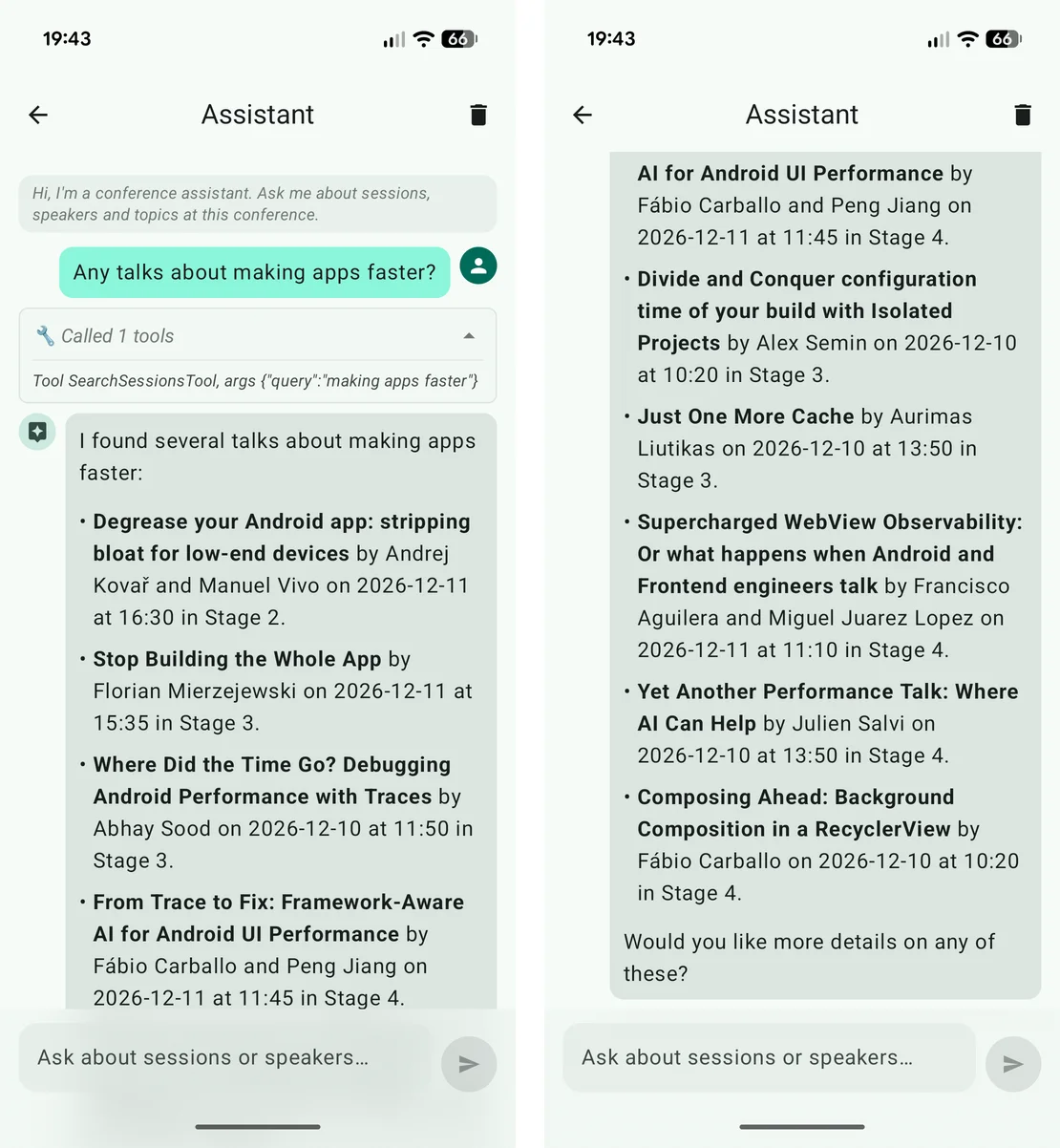
Here’s an example from the app, where the agent passes “making apps faster” to SearchSessionsTool. None of the sessions contain that phrase, so the keyword-based GetSessionsTool finds nothing, but semantic search returns talks that are mostly about app or build performance.
Moving to the Tensor G5 NPU
The model repo also includes a version of EmbeddingGemma 2 precompiled for the Tensor G5 NPU (embeddinggemma-2-text-270m_Google_Tensor_G5.litertlm). Using it needs the Tensor NPU runtime, which lets LiteRT run models on the NPU.
litertNpu = "2.3.0"
litert-npu-runtime-google-tensor = { module = "com.google.ai.edge.litert:litert-npu-runtime-google-tensor", version.ref = "litertNpu" }
We then pick the embedder in Koin based on which model file is present and which chip the phone has. Vectors from different models aren’t comparable, so each model file also gets its own embedding cache directory.
single<Embedder> {
    val filesDir = androidContext().getExternalFilesDir(null)
    val tensorModel = filesDir?.resolve(LiteRtEmbedder.TENSOR_G5_MODEL_FILE_NAME)
    val cpuModel = filesDir?.resolve(LiteRtEmbedder.MODEL_FILE_NAME)
    if (tensorModel?.exists() == true && Build.VERSION.SDK_INT >= 31 && Build.SOC_MODEL == "Tensor G5") {
        LiteRtEmbedder(
            modelFile = tensorModel,
            backend = Backend.NPU(nativeLibraryDir = androidContext().applicationInfo.nativeLibraryDir),
            cacheDir = androidContext().cacheDir,
        )
    } else if (cpuModel?.exists() == true) {
        LiteRtEmbedder(cpuModel, Backend.CPU(), androidContext().cacheDir)
    } else {
        ApiEmbedder(/* Gemini embeddings, as before */)
    }
}
The difference was significant, particularly for memory, since the model weights live in the NPU’s memory rather than the app’s.
| CPU | Tensor G5 NPU | |
|---|---|---|
| Index build (63 sessions, 126 embeddings) | ~19 s | ~6 s |
| Per embedding | ~150 ms | ~42 ms |
| App native memory | ~460 MB | ~70 MB |
In a quick check the two models scored sessions almost identically (0.820/0.682 for a relevant and an unrelated session on the CPU, 0.823/0.676 on the NPU). The vectors are cached on disk, so the index build is a one-off cost per conference, and later searches only need to embed the query.
NPU support is very device specific though. The NPU model is compiled per chip, and is gated on Build.SOC_MODEL == "Tensor G5" here, so other devices use the CPU model (or Gemini).
A couple of things I haven’t done yet: building the index in the background when a conference is opened (rather than on the first question), and invalidating cached vectors when a session’s text changes (the cache is currently keyed only by session id).