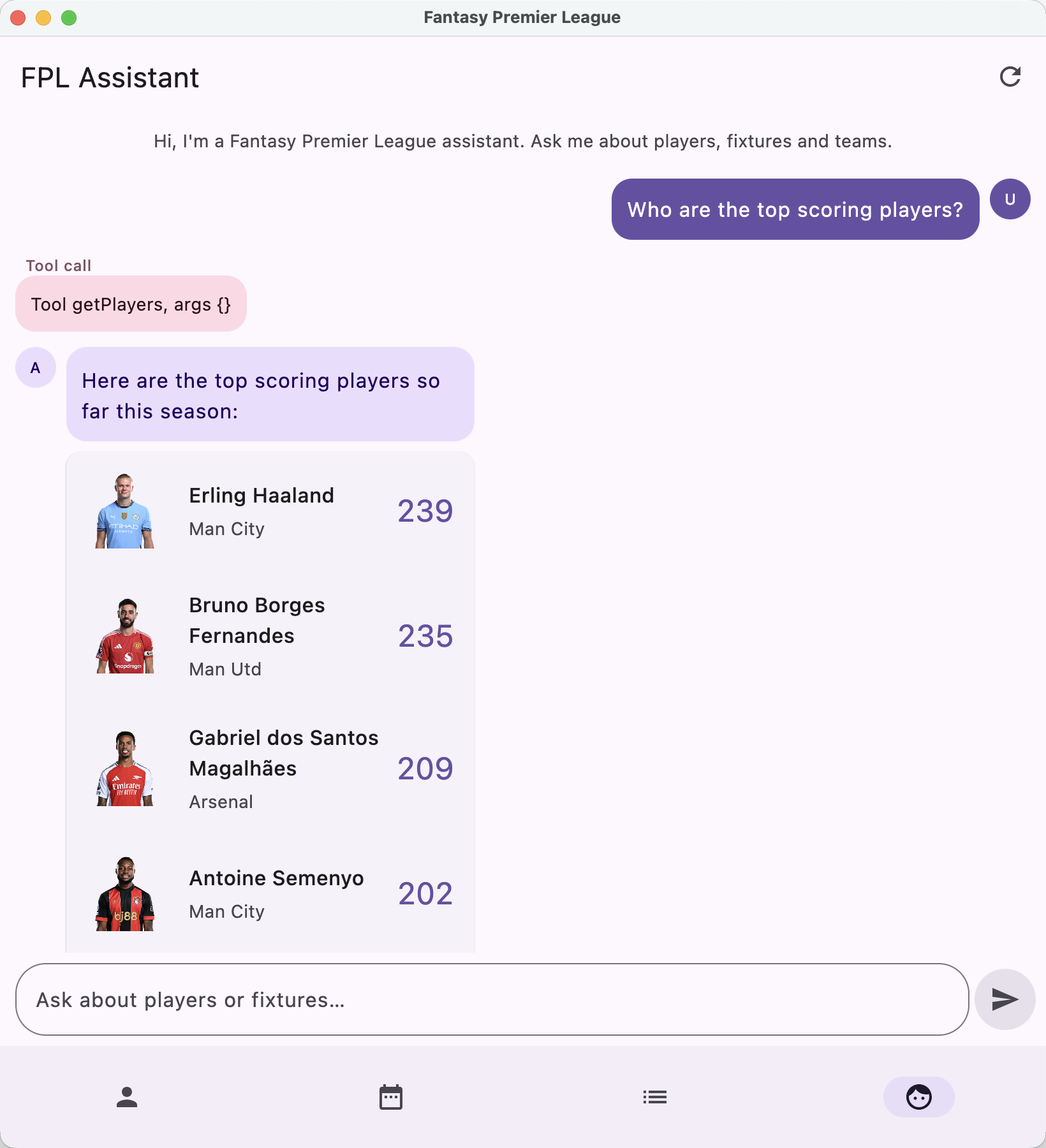
Koog is JetBrains’ Kotlin framework for building AI agents. In this article we’re going to use it to add an in-app “FPL Assistant” to the FantasyPremierLeague Compose Multiplatform sample. This is a chat screen where you can ask about players, fixtures and mini-league standings. The answers render as player and fixture cards rather than just as text.
To get the cards working we’re making use of Koog’s structured output support, so that the agent returns typed data (the exact ids of the players and fixtures it referenced) rather than us having to parse names back out of a prose response.
I’ve previously added Koog based assistants to the ClimateTraceKMP and Confetti samples but have been using plain text responses for those.
Adding Koog
Koog is added through the following dependencies (the core koog-agents module along with the executors module that provides the various LLM clients). We’re also adding the multiplatform-markdown-renderer which we use to render the assistant’s markdown responses.
libs.versions.toml
1
2
3
koog-agents = { module = "ai.koog:koog-agents", version.ref = "koogAgents" }
koog-executor-llms-all = { module = "ai.koog:prompt-executor-llms-all", version.ref = "koogExecutors" }
markdown-renderer = { module = "com.mikepenz:multiplatform-markdown-renderer-m3", version.ref = "markdownRenderer" }
The LLM model and the PromptExecutor that drives it are provided for each platform using KMP’s expect/actual. Right now we’re using a Gemini model and the associated executor for all platforms but that can be customised as needed.
1
2
expect fun getLLModel(): LLModel
expect fun getPromptExecutor(): PromptExecutor
1
2
3
4
5
6
// androidMain / jvmMain / iosMain
actual fun getLLModel() = GoogleModels.Gemini2_5Flash

actual fun getPromptExecutor(): PromptExecutor {
    return simpleGoogleAIExecutor(BuildKonfig.GEMINI_API_KEY)
}
Structured output
Before creating the agent we define the data class we want it to return. The idea is that text holds a short markdown lead-in and playerIds/fixtureIds hold the exact FPL ids of any players and fixtures the answer referenced. Koog turns this into a JSON schema for us, and the @LLMDescription annotations become part of that schema, so we use them to describe what each field is for.
1
2
3
4
5
6
7
8
9
10
@Serializable
@LLMDescription("A Fantasy Premier League assistant answer")
data class FplAnswer(
    @property:LLMDescription("The user-facing answer, formatted as markdown")
    val text: String,
    @property:LLMDescription("The FPL 'id' of every player referenced in the answer, to display as cards; empty if none")
    val playerIds: List<Int> = emptyList(),
    @property:LLMDescription("The 'id' of every fixture referenced in the answer, to display as cards; empty if none")
    val fixtureIds: List<Int> = emptyList(),
)
Getting the ids back like this means we can resolve them against our own data and reuse the existing PlayerView composable to render each player. The alternative (having the model mention players by name and matching those names back against our data) is error prone, as the model might for example write “Haaland” where our data has “Erling Haaland”.
The tools
The agent gets its data through tools that are backed by the app’s existing FantasyPremierLeagueRepository. There’s one for players, one for fixtures, and the one shown below for the user’s tracked mini-leagues. These are plain Koog SimpleTool implementations.
1
2
3
4
5
6
7
8
9
10
11
12
13
14
15
16
17
18
19
class GetLeagueStandingsTool(val fantasyPremierLeagueRepository: FantasyPremierLeagueRepository) : SimpleTool<Unit>(
    argsType = typeToken<Unit>(),
    name = "getLeagueStandings",
    description = "Get the standings for the user's tracked mini-leagues"
) {
    override suspend fun execute(args: Unit): String {
        val leagueIds = fantasyPremierLeagueRepository.leagues.first()
        if (leagueIds.isEmpty()) return "The user is not tracking any mini-leagues."
        return leagueIds.mapNotNull { leagueId ->
            runCatching {
                val standings = fantasyPremierLeagueRepository.getLeagueStandings(leagueId.trim().toInt())
                val rows = standings.standings.results.joinToString("\n") { result ->
                    "${result.rank}. ${result.entryName} (${result.playerName}) - ${result.total} pts"
                }
                "League '${standings.league.name}':\n$rows"
            }.getOrNull()
        }.joinToString("\n\n").ifEmpty { "No league standings available." }
    }
}
Creating the agent
The agent is created in a FantasyPremierLeagueAgentProvider. The three tools are registered in a ToolRegistry, and we install a Koog EventHandler so the UI can stream the intermediate tool calls and any errors as they happen.
1
2
3
4
5
6
7
8
9
10
11
12
13
14
15
16
17
18
19
20
21
val toolRegistry = ToolRegistry {
    tool(GetPlayersTool(repository))
    tool(GetFixturesTool(repository))
    tool(GetLeagueStandingsTool(repository))
}

return AIAgent(
    promptExecutor = getPromptExecutor(),
    strategy = createStrategy(onAssistantMessage),
    agentConfig = agentConfig,
    toolRegistry = toolRegistry,
) {
    install(EventHandler) {
        onToolCallStarting { ctx ->
            onToolCallEvent("Tool ${ctx.toolName}, args ${ctx.toolArgs}")
        }
        onAgentExecutionFailed { ctx ->
            onErrorEvent("${ctx.error.message}")
        }
    }
}
We’re passing in a functionalStrategy, which lets us drive the conversation ourselves. There are two loops here. The inner one runs the usual tool-call cycle (call the LLM, run any tools it asked for, feed the results back, repeat until it’s done). The outer one keeps the conversation going across user turns, ending when the user sends an empty reply.
Once the model has finished its tool calls we make one more call using requestLLMStructured<FplAnswer> to get that answer back as our typed data. We also pass a StructureFixingParser, which makes a couple of extra LLM calls to repair the response if it doesn’t quite conform to the schema. If it still can’t be parsed we fall back to wrapping the raw text in an FplAnswer.
1
2
3
4
5
6
7
8
9
10
11
12
13
14
15
16
17
18
19
20
21
22
23
24
25
26
27
private fun createStrategy(onAssistantMessage: suspend (FplAnswer) -> String) =
    functionalStrategy<String, String> { initialInput ->
        var inputMessage = initialInput
        var lastText = ""

        while (inputMessage.isNotEmpty()) {
            var response = requestLLM(inputMessage)

            while (getToolCalls(response).isNotEmpty()) {
                val results = executeTools(response)
                response = sendToolResults(results)
            }

            val answer = requestLLMStructured<FplAnswer>(
                "Return your final answer as structured data. Put the FPL 'id' of every player you " +
                    "referenced in 'playerIds' and every fixture in 'fixtureIds'. Those players/fixtures are " +
                    "shown to the user as cards, so 'text' should be a brief markdown lead-in or summary and " +
                    "must NOT re-list the individual players or fixtures. If there are no ids, put the full " +
                    "answer in 'text'.",
                fixingParser = StructureFixingParser(getLLModel(), retries = 2),
            ).getOrNull()?.data ?: FplAnswer(text = response.textContent())

            lastText = answer.text
            inputMessage = onAssistantMessage(answer)
        }
        lastText
    }
The onAssistantMessage callback is how each turn gets back out to the UI. It’s passed the FplAnswer, and whatever it returns becomes the next user message.
Rendering the response
On the UI side the AgentViewModel receives each FplAnswer and resolves the id lists into the actual model objects. It caches the full player and fixture lists on first use and keeps the order the agent gave us, so the cards appear in whatever ranking the model decided on.
The resolved players and fixtures are attached to the message, and AgentScreen then renders the markdown text in a chat bubble with the player and fixture cards underneath (reusing the same PlayerView and ClubInFixtureView composables used elsewhere in the app). The assistant is reachable from a new “Assistant” tab in the bottom navigation, alongside the existing players, fixtures and leagues screens.
Ask it something like “who are the top scoring players?” and you get back a short summary followed by a set of tappable player cards.
The code shown here is part of the common module in the FantasyPremierLeague repository.
Featured in Android Weekly #738
Related tweet
Adding a Koog #AI assistant (with structured output) to the FantasyPremierLeague #CMP sample https://t.co/4Ma8xXy5mf
— John O'Reilly (@joreilly) July 29, 2026