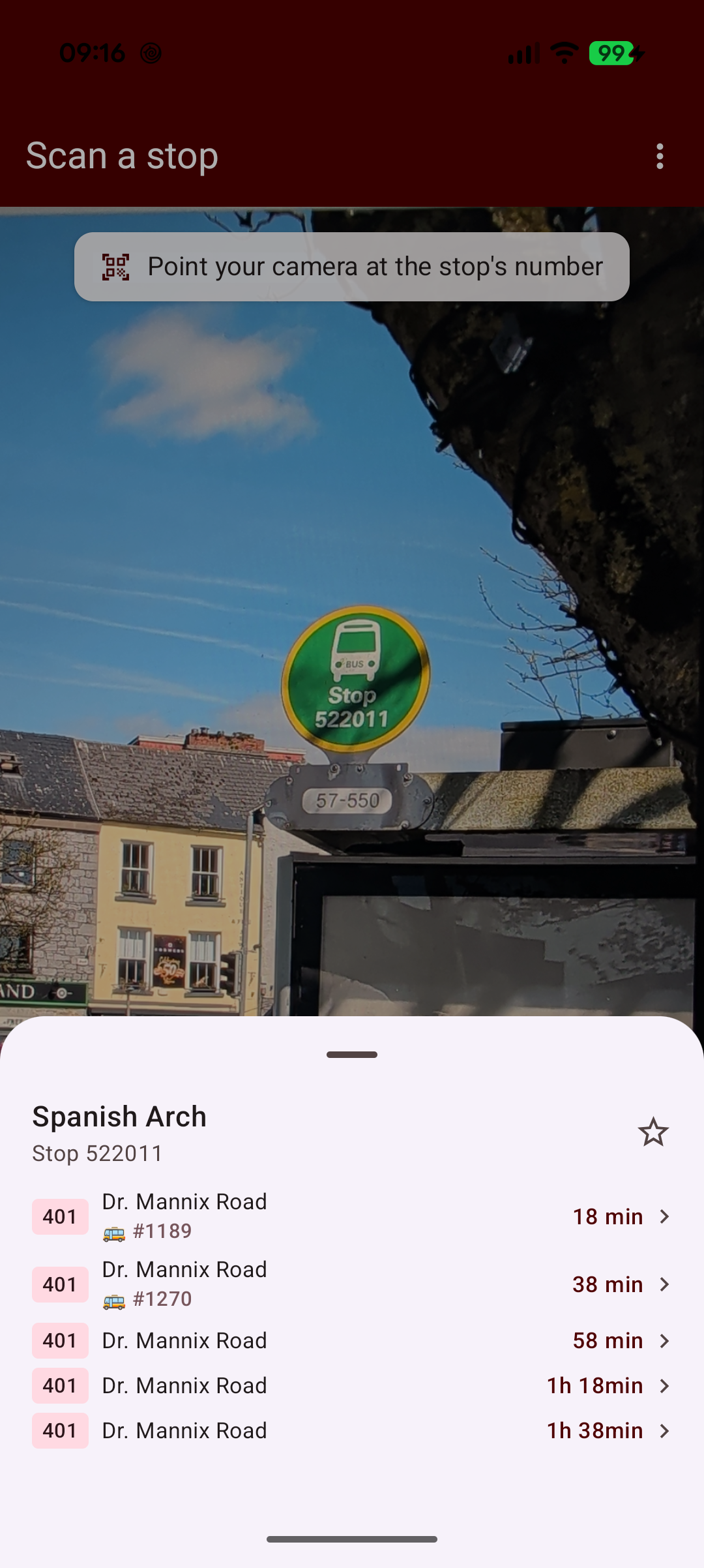
Every bus stop in Galway has a plate with a 6-digit stop code printed on it. We recently added a “Scan” tab to the GalwayBus app that lets you point the camera at that plate and jump straight to the stop’s departures. The text recognition runs entirely on device (ML Kit on Android, Apple’s Vision framework on iOS), with the camera preview, matching logic and UI all living in the shared Compose Multiplatform code.
In this article we’ll look at how that’s put together: the expect/actual camera scanner, the per-platform OCR implementations, and how we match the recognised text to a stop.
The shared API
We declare two things in the shared module: a capability flag and a camera preview composable that streams recognised text. Desktop and Web have no camera/OCR implementation so the flag is false there and the Scan tab is simply hidden.
shared/src/commonMain/kotlin/dev/johnoreilly/galwaybus/scan/StopScanner.kt
1
2
3
4
5
6
7
expect val isStopScanSupported: Boolean

@Composable
expect fun CameraTextScanner(
    onText: (String) -> Unit,
    modifier: Modifier = Modifier
)
CameraTextScanner stays minimal: it just invokes onText with whatever the recogniser reads from each frame. All the interpretation (what counts as a stop code, debouncing, opening the departures sheet) stays in common code, so the platform implementations only have to worry about the camera and OCR.
Android: CameraX + ML Kit
On Android we use a CameraX PreviewView (via AndroidView) with an ImageAnalysis use case feeding frames to ML Kit’s on-device text recogniser.
1
2
3
4
5
6
7
8
val analysis = ImageAnalysis.Builder()
    .setBackpressureStrategy(ImageAnalysis.STRATEGY_KEEP_ONLY_LATEST)
    .build()
    .also { it.setAnalyzer(analysisExecutor, TextAnalyzer(recognizer) { currentOnText(it) }) }
provider.unbindAll()
provider.bindToLifecycle(
    lifecycleOwner, CameraSelector.DEFAULT_BACK_CAMERA, preview, analysis
)
The analyzer holds each ImageProxy open until recognition completes; combined with STRATEGY_KEEP_ONLY_LATEST this means only one recognition request is ever in flight and newer frames are just dropped rather than queueing up.
1
2
3
4
5
6
7
8
9
10
11
12
13
14
15
16
private class TextAnalyzer(
    private val recognizer: TextRecognizer,
    private val onText: (String) -> Unit
) : ImageAnalysis.Analyzer {
    override fun analyze(imageProxy: ImageProxy) {
        val mediaImage = imageProxy.image
        if (mediaImage == null) {
            imageProxy.close()
            return
        }
        val image = InputImage.fromMediaImage(mediaImage, imageProxy.imageInfo.rotationDegrees)
        recognizer.process(image)
            .addOnSuccessListener { result -> if (result.text.isNotBlank()) onText(result.text) }
            .addOnCompleteListener { imageProxy.close() }
    }
}
The runtime camera permission needs an Activity, which shared code can’t reach. It’s bridged the same way the app already bridges location permission: MainActivity registers an ActivityResultContracts.RequestPermission launcher and publishes a suspend function the shared scanner can call.
1
2
3
4
object CameraController {
    @Volatile
    var permissionRequester: (suspend () -> Boolean)? = null
}
iOS: AVCaptureSession + Vision
On iOS we wrap a UIView holding an AVCaptureVideoPreviewLayer in a UIKitView, with an AVCaptureVideoDataOutput delegate running a VNRecognizeTextRequest over each delivered frame. It’s all written in Kotlin against the Kotlin/Native platform bindings.
1
2
3
4
5
6
7
8
9
10
11
12
13
14
15
16
17
private val request = VNRecognizeTextRequest(completionHandler = { req, error ->
    if (error == null) {
        val text = buildString {
            req?.results?.forEach { observation ->
                (observation as? VNRecognizedTextObservation)
                    ?.topCandidates(1.convert<NSUInteger>())
                    ?.firstOrNull()
                    ?.let { (it as VNRecognizedText).string }
                    ?.let { append(it).append('\n') }
            }
        }
        if (text.isNotBlank()) dispatch_async(dispatch_get_main_queue()) { onText(text) }
    }
}).apply {
    recognitionLevel = VNRequestTextRecognitionLevelFast
    usesLanguageCorrection = false
}
VNRequestTextRecognitionLevelFast is plenty for big printed digits on a plate, and turning language correction off stops Vision from auto-correcting a digit run into a word. Frame dropping mirrors the Android setup: the delegate runs on a serial queue with alwaysDiscardsLateVideoFrames = true, so frames arriving while a recognition pass is in flight are discarded.
Matching the text to a stop
The recognised text is noisy: a plate in frame typically also has the operator’s name, route numbers and whatever else is behind it, so StopMatcher pulls full 6-digit runs out of the text and requires an exact stop_id match.
shared/src/commonMain/kotlin/dev/johnoreilly/galwaybus/scan/StopMatcher.kt
1
2
3
4
5
6
7
8
9
10
11
12
object StopMatcher {
    private val sixDigits = Regex("\\d{6}")

    fun match(recognizedText: String, stops: List<Stop>): Stop? {
        if (recognizedText.isBlank() || stops.isEmpty()) return null
        val normalized = recognizedText.replace("-", "").replace(" ", "")
        val byId = stops.associateBy { it.stop_id }
        return sixDigits.findAll(normalized)
            .map { it.value }
            .firstNotNullOfOrNull { byId[it] }
    }
}
The dash/space stripping is there because some plates (and some OCR passes) break the code up into groups, so “5234-41” needs to read as one 6-digit run. Being plain Kotlin in commonMain, this is easy to cover with unit tests in commonTest, including cases like “Route 401” not matching anything and codes split across separators.
Wiring it into the app
We only show the Scan tab where the platform supports it:
1
2
private val visibleTopTabs: List<TopTab> =
    TopTab.entries.filter { it != TopTab.SCAN || isStopScanSupported }
The tab itself is a full-screen CameraTextScanner with a hint card overlaid. When a frame matches a stop, the app calls the same selectMapStop used when you tap a stop marker on the map. A scan drops you into the identical departures sheet, with the same favouriting and live bus tracking available from there.
1
2
3
4
5
6
7
8
9
10
11
12
CameraTextScanner(
    onText = { text ->
        if (viewModel.mapStop == null) {
            val stop = viewModel.matchScannedStop(text)
            if (stop != null && stop.stop_ref != handledStopRef) {
                handledStopRef = stop.stop_ref
                viewModel.selectMapStop(stop)
            }
        }
    },
    modifier = Modifier.fillMaxSize()
)
The code shown here is in the shared module of the GalwayBus repository.